

Smart App Control: Some issues in developer mode
Recently ran into an issue where WPF apps were blocked from running when being developed, specifically in Visual Studio. One solution was to just copy and work on the project in another folder until it falls over again, an alternative is to run directly from the DLL, and another is to turn off “Smart App Control” but … consequences
Have recently been developing some apps wrt generating individual certificates for an athletics event and forwarding them to the competitor via email. These work OK but sometimes I get a blocker:
An Application Control policy has blocked this file
Nb: This was when the WPF app project copied across from one solution (where it worked OK) to another. Did not have that problem in the original.
Copilot Suggests inserting:
<UseAppHost>false</UseAppHost>
The app csproj runs from DLL not .exe with that setting.
It runs OK that way.
Violet Hansen MVP suggested having a look at things with her app AppControlManager (on GitHub)
The link to the built app is here.
This showed that the issue is Smart App Control About Smart App Control. Namely running an unsigned app .exe when in development mode. If the app was published it would be signed.
For later reference, my system is
Edition Windows 11 Pro
Version 26H2
Installed on 22/07/2026
OS build 26300.9711
Experience Windows Feature Experience Pack 1000.26100.372.0
Copilot Summary of the discussion: (Click to expand)
Summary of Re: WPF App Problem: An Application Control policy has blocked this file.

The .NET MVP community was contacted after Visual Studio began blocking execution of a WPF application's generated EXE with the error:"An Application Control policy has blocked this file." Investigation found Code Integrity (WDAC) events 3033 and 3077 indicating the EXE did not meet enterprise signing requirements, even though the machine was not believed to be managed by an enterprise policy.

Violet Hansen MVP identified the issue as Windows Defender Application Control (WDAC) / Smart App Control and recommended using AppControl Manager to inspect policies. She explained that Smart App Control policies cannot be exempted individually and normally must be disabled if they interfere with development workflows.

During troubleshooting, I found that:

Running from the DLL worked when <UseAppHost>false</UseAppHost> was used.
Creating a renamed copy of the project temporarily avoided the block.
The issue later returned after further changes.
This system is running Windows 11 Pro 26H2 (OS build 26300.9711).

Violet Hansen advised:

Updating Windows because (evidently) newer 26H2 builds allow Smart App Control to be re-enabled after being turned off.
Disabling Smart App Control on development machines since developers frequently generate unsigned executables.
Considering AppControl Manager and WDAC policies for more granular control.

> But I already had build 26H2 of Windows.


Bottom line: The consensus in the thread is that the problem is caused by Windows Smart App Control / WDAC enforcing signing requirements on locally built debug executables, rather than by a bug in the WPF project itself.
The big issues with turning off Smart App Control are
- It might make your system vulnerable. There are reasons why we sign code when we deploy it; security, trust, versioning etc.
- The action might not be reversible requiring a system reset to undo
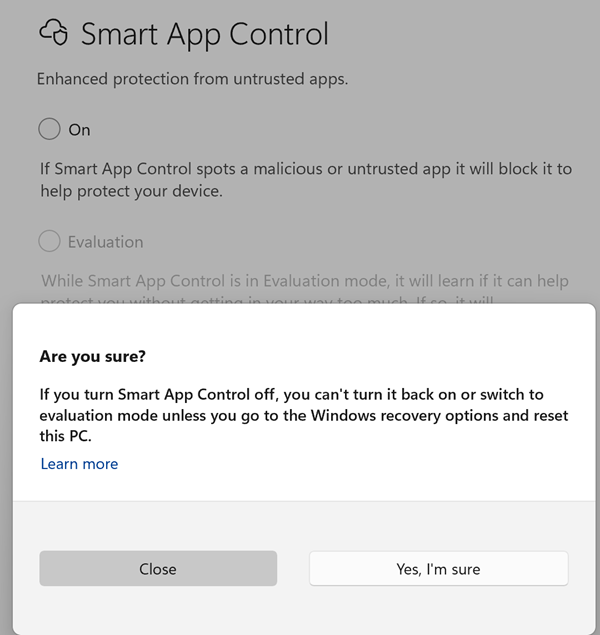
Tap and rotate phone to enlarge.
An issue
To be reversible or to not be reversible that is the question. With apologies to Shakespeare.
Can I disable Smart App Control?
You are able to disable Smart App Control in the Windows Security App settings. Recent Windows updates allow Smart App Control to be re‑enabled without requiring a clean installation.
Conclusion
To cut a long story short, when coding as a developer, disable Smart App Control if you meet this hurdle or use the DLL approach. Hopefully the re-enabling issue does get resolved in the future.
When an app is deployed it will be signed so this is not an issue then.
Nb: I just might be a matter of which folder you develop your code in ??
| Topic | Subtopic | |
| < Prev: | Athletics Certificate Generator | A report on some tweaks to further generalize the scripts |
| This Category Links | ||
| Category: | Application Dev Index: | Application Dev |


