

Checkers-Drafts Game: Groups Feature Implementation
ai drafts checkers blazor groups sqlite ef database entityframework
Complete implementation of a Groups feature for the Drafts application, allowing administrators to create groups, assign players, and restrict game visibility based on group membership.
Overview
AI-assisted development of a Groups feature for the Checker-Drafts game application. Development was largely through specifications GitHub Copilot was initially used to define the game. WindSurf was then used add features the game. The game runs as a Blazor Service application with a SQLite database. The Groups feature allows for better organization of players and games, enabling private games for specific groups.
This document text was in the main was written through specifications to WindSurf after this feature was completed. Images added manually.
“Please generate list all requests/steps with respect to adding Groups to the app as a Markdown document.”
Query to WindSurf: Add Group membership:
- Admin creates groups and assigns a player as a group owner/leader
- Player is invited by Group owner or requests to join a group. (Later)
- Game initiator selects a group to associate the game with when creating a game.
- Player is only able to see games to join for which they are a member.
- Also Only games in list to join that have not been joined.
The game database is a SQLite database file.
- A Group has a name, optional description, an player who is an owner and a player who joins
- A Game has one Group
- A Group has a Group Owner
- When they have connected, a Group has a joined player.
- Currently Groups are created by the admin and players are added to groups by the Admin.
- Players can be in multiple groups.
- When a player creates a game, they can select one of their groups to associate the game with.
- Games are associated with a group and are only visible to members of that group to join.
- It is envisaged that in the future players will be able to create their own groups and manage their membership, but for now this is an admin-only feature.
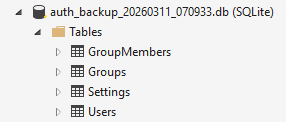
Database tables
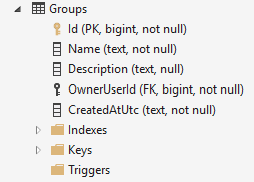
Database Group Table
Phase 1: Database Schema and Admin UI
1.1 Database Entities
File: Data/Group.cs
- Created
Groupentity with Id, Name, OwnerUserId, CreatedUtc - Created
GroupMemberentity with GroupId, UserId, AddedByUserId, AddedUtc - Added navigation properties for relationships
1.2 Database Context
File: Data/AppDbContext.cs
- Added
DbSet<Group>andDbSet<GroupMember> - Configured entity relationships in
OnModelCreating - Set up foreign key constraints and indexes
1.3 Database Seeding
File: Data/DbSeeder.cs
- Added SQL commands to create Groups and GroupMembers tables
- Ensured proper table structure with foreign keys
1.4 Admin Groups UI
File: Components/Pages/AdminGroups.razor
- Created complete admin interface for group management
- Features: Create groups, delete groups, manage members
- Added member search and assignment functionality
- Fixed null reference exceptions in member management
1.5 Admin Service Methods
File: Services/AuthService.cs
- Added
GetUserGroupsAsync()- Get groups for a user - Added
ListGroupsAsync()- List all groups - Added
CreateGroupAsync()- Create new group - Added
DeleteGroupAsync()- Delete group (admin only) - Added
GetGroupMembersAsync()- Get group members - Added
AddGroupMemberAsync()- Add member to group - Added
RemoveGroupMemberAsync()- Remove member from group - Fixed EF Core translation issues with string.Contains
1.6 Admin Navigation
File: Components/Pages/Admin.razor
- Added “Manage groups” link to admin menu
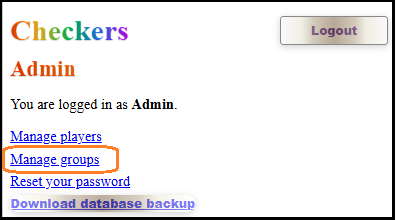
1.6.1 Accessing Group Management from /Admin
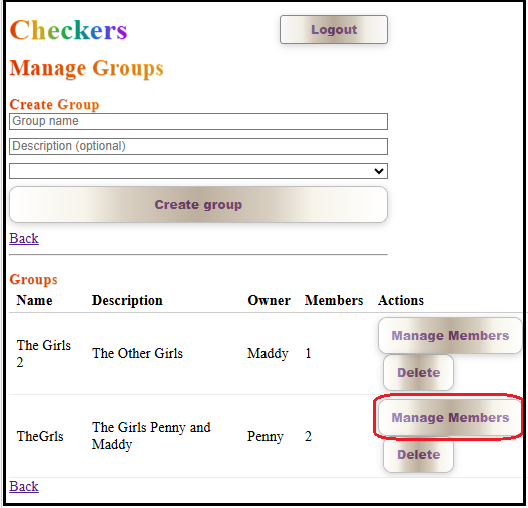
1.6.2 Manage Groups
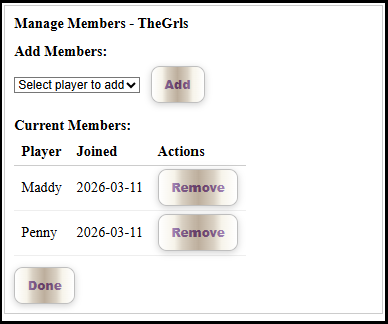
1.6.3 Managing Players of a Group
Phase 2: Game Integration
2.1 Game Entity Update
File: Services/DraftsService.cs
- Added
GroupIdproperty toDraftsGameclass - Updated
CreateGamemethods to acceptgroupIdparameter - Modified game creation to assign group to game
2.2 Player Page Group Selection
File: Components/Pages/Player.razor
- Added group selection dropdown above “Start a new game” button
- Load user’s groups in
OnInitializedAsync - Added fields:
_userGroups,_selectedGroupId - Changed “Start a new game” to use Blazor event handler
- Added
StartNewGame()method to navigate with group
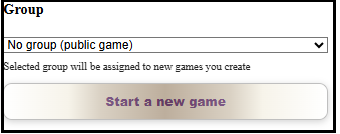
Game initiator: Can select Group
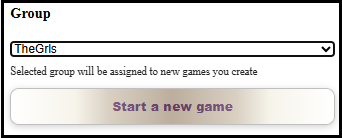
Game Selected Group, that wil be applied when game is started
2.3 Game Creation with Group
File: Components/DraftsGame.razor
- Added
_groupIdfield - Parse
groupIdfrom query string inOnInitializedAsync - Pass
groupIdtoGameService.CreateGamemethod
Phase 3: Game Filtering
3.1 GameListItem Update
File: Services/DraftsService.cs
- Added
GroupIdtoGameListItemrecord - Updated
ListGames()method to include GroupId
3.2 Game Filtering Logic
File: Components/Pages/Player.razor
- Modified
RefreshGames()to be async and include group filtering - Added logic: Show public games (no GroupId) OR games where user is group member
- Updated all calls to
RefreshGames()to handle async - Enhanced
FormatGameOption()to show group information
3.3 UI Updates
- Game options now display
[GroupName]or[Public]labels - Players only see games they’re allowed to join
- Group games restricted to group members
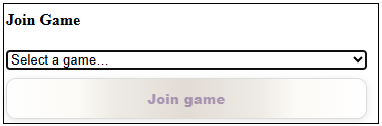
Joining player can only select a game for which they are a memeber of its Group
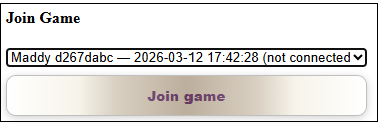
Joining Player Selects Game For which they are a Member of its Group
Phase 4: Database Download Feature
It was decided to implement the download of the database by user Admin so that
during development its structure and content could be verified.
Query to WinSurf: Can we add an option on /Admin to download the database file auth.db in /wwwroot`?
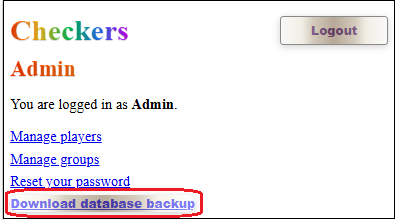
Downloading the database file`
4.1 Database Download Endpoint
File: Program.cs
- Added Minimal API endpoint
/api/admin/download-database - Admin-only authorization with role-based check
- Implemented file locking workaround using temporary copies
- Added comprehensive error handling and logging
4.2 Admin Download UI
File: Components/Pages/Admin.razor
- Added “Download database backup” link/button
- Form submission approach for proper authentication
4.3 Authorization Fixes
- Fixed authorization policy from
"Admin"to role-based authorization - Resolved admin login issues
- Added debugging endpoints for troubleshooting
Technical Challenges Solved
1. EF Core Translation Issues
- Fixed
string.Containswith case-insensitive comparison - Resolved null propagation operator issues in expression trees
2. Null Reference Exceptions
- Added null checks in AdminGroups.razor for
_groupMembers - Fixed lambda expression syntax with proper Blazor event handlers
3. Authentication and Authorization
- Resolved admin login failures due to missing authorization policies
- Fixed controller routing conflicts by switching to Minimal API
- Implemented proper role-based authorization
4. File Locking Issues
- SQLite database locking prevented direct file reads
- Implemented temporary file copy approach for database downloads
- Added proper cleanup of temporary files
5. Async Method Integration
- Converted synchronous game refresh to async for group filtering
- Updated all method signatures and calls to handle async operations
- Fixed Blazor component lifecycle methods
Final Features
✅ Group Management
- Admin can create/delete groups
- Admin can assign/remove group members
- Group owners and member tracking
✅ Game Creation with Groups
- Players can select group when creating games
- Games assigned to specific groups or remain public
- Group information stored with game data
✅ Game Filtering
- Players only see games from their groups + public games
- Game list shows group membership information
- Real-time filtering with async updates
✅ Database Backup
- Admin-only database download functionality
- Timestamped backup files
- Handles SQLite file locking properly
Usage Flow
- Admin Setup:
- Login as admin
- Navigate to
/admin/groups - Create groups and assign members
- Player Experience:
- Login as player
- See group selection dropdown
- Select group and create game
- View filtered game list based on membership
- Game Privacy:
- Public games visible to all players
- Group games only visible to group members
- Clear labeling of game types
Files Modified/Created
New Files:
Data/Group.cs- Group entitiesControllers/AdminController.cs- Database download (later removed)
Modified Files:
Data/AppDbContext.cs- Group DbSets and configurationData/DbSeeder.cs- Group table creationServices/AuthService.cs- Group management methodsServices/DraftsService.cs- Game group integrationComponents/Pages/AdminGroups.razor- Group management UIComponents/Pages/Admin.razor- Admin navigation and downloadComponents/Pages/Player.razor- Group selection and filteringComponents/DraftsGame.razor- Group parameter handlingProgram.cs- Database download endpoint and authorization fixes
Testing Checklist
- Admin can create groups
- Admin can assign players to groups
- Players see their groups in dropdown
- Games created with selected group
- Game list properly filtered by membership
- Public games visible to all
- Group games only visible to members
- Database download works for admins
- No authentication errors
- No file locking issues
Status: ✅ Complete and ready for production use in V4.1.0
Database Schema
Groups Table
CREATE TABLE IF NOT EXISTS "Groups" (
    "Id" INTEGER NOT NULL CONSTRAINT "PK_Groups" PRIMARY KEY,
    "Name" TEXT NOT NULL,
    "OwnerUserId" INTEGER NOT NULL,
    "CreatedUtc" TEXT NOT NULL,
    CONSTRAINT "FK_Groups_Users_OwnerUserId" FOREIGN KEY ("OwnerUserId") REFERENCES "Users" ("Id") ON DELETE CASCADE
);
GroupMembers Table
CREATE TABLE IF NOT EXISTS "GroupMembers" (
    "GroupId" INTEGER NOT NULL,
    "UserId" INTEGER NOT NULL,
    "AddedByUserId" INTEGER NOT NULL,
    "AddedUtc" TEXT NOT NULL,
    CONSTRAINT "PK_GroupMembers" PRIMARY KEY ("GroupId", "UserId"),
    CONSTRAINT "FK_GroupMembers_Groups_GroupId" FOREIGN KEY ("GroupId") REFERENCES "Groups" ("Id") ON DELETE CASCADE,
    CONSTRAINT "FK_GroupMembers_Users_AddedByUserId" FOREIGN KEY ("AddedByUserId") REFERENCES "Users" ("Id") ON DELETE CASCADE,
    CONSTRAINT "FK_GroupMembers_Users_UserId" FOREIGN KEY ("UserId") REFERENCES "Users" ("Id") ON DELETE CASCADE
);
API Endpoints
Database Download
- GET
/api/admin/download-database - Authorization: Admin role required
- Response: SQLite database file download
- Features: Temporary file copy to handle locking
Configuration
Authorization
- Role-based authorization using
RequireRole("Admin") - Cookie-based authentication
- Admin role stored in user.Roles field
Database
- SQLite with EF Core
- Manual table creation in DbSeeder
- Foreign key constraints enabled
Performance Considerations
- Game list filtering performed in memory after database query
- Group membership cached per user session
- Async operations for non-blocking UI
- Temporary files cleaned up after database download
Security
- Admin-only database download
- Group membership verification
- Role-based access control
- SQL injection prevention through EF Core
Update
Add some features to Lobby Chat:
- Player only see Chat from players who are members of groups that he player is member of.
- When player deletes lobby chat it is only deleted for that player and not for all players in the lobby
- Future: Make Lobby Chat quite Group specific
- Future Player can disable Lobby Chat, but would not stop player for still sending chat from any group.
Status: ✅ Complete and ready for production use in V4.1.0
| Topic | Subtopic | |
| Next: > | Checkers-Draughts Game | Group Chat Enhancements |
| < Prev: | Checkers-Draughts Game | Speech Chat Feature Implementation |
| This Category Links | ||
| Category: | Artificial Intelligence Index: | Artificial Intelligence |


