

Creating this site again: GitHub Pages --- Getting Started
web github github-pages azure azure-frontdoor frontdoor blobstorage
Insert summary here
Initial Actions
- The original site source was copied to a new folder.
- Needed to add a GitHub Plugin to the
Gemfilein the root of the repository and run bundle install to get the GitHub Pages gem installed:gem 'github-pages', group: :jekyll_plugins - The site was built using Jekyll, so you can also view it locally by running:
bundle exec jekyll serve - The site was then committed to a new private repository on GitHub at
djaus2/DavidJones.github.io… The commit worked locally! But …
Large files in the repository
… Bad news: GitHub rejected the push because there were files that exceed GitHub’s 100 MB file size limit.
So had to reduce the size of the files in the repository. So find the largest files.
Files that are too large:
- apps/athstitcher/downloads/AthStitcherInstall_1.1.1.0_x64.msix (152 MB)
- apps/athstitcher/downloads/AthStitcherInstall_1.1.1.0_x86.msix (137 MB)
- media/Devices.zip (140 MB)
- posts/App/Application Files/…/OpenCvSharpExtern.dll.deploy (59 MB - warning)
I did a check of the local built folder size in _site folder. The size was 2.3G!
Best solution: Remove these large files from Git and add them to .gitignore. These installer files and zips shouldn’t be in your repository anyway. Better to place them in an external site and link from there. (More in a later post)
The alternative is to use GitHub Releases where you make available a built version of the app in its own GitHub repository and you use a link to it from the blog post.
This reduced _site size to 1.5G. It was suggested that the site limit is 1 gig??
Viewing the site when setup on GitHub Pages
The repository is at
https://github.com/djaus2/DavidJones.github.ioNote that it is Private.
How to view built site?
The GitHub Pages site is available at:
https://djaus2.github.io/DavidJones
This is public.
Enable/check GitHub Pages:
- Go to the repository
- Click
Settings(top right) - Click Pages (left sidebar)
- Under “Build and deployment”:
- Source: Deploy from a branch
- Branch: main / root or main / docs (choose root)
- Click Save
- To check build status:
- Go to the
Actionstab in your repository to see if Jekyll is building successfully
- Go to the
- Wait a few minutes for the build to complete
- The URL will appear at the top of the Page tab: “Your site is live at
https://djaus2.github.io/DavidJones
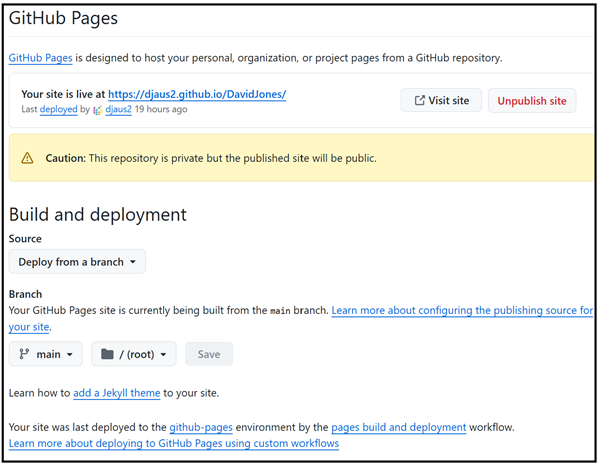
GitHub Settings-Pages
_config.yml
There was a need to update the _config.yml file for the site url and base url
url: "https://djaus2.github.io/DavidJones"
baseurl: ""
This was committed and the site loaded properly in a browser once built.
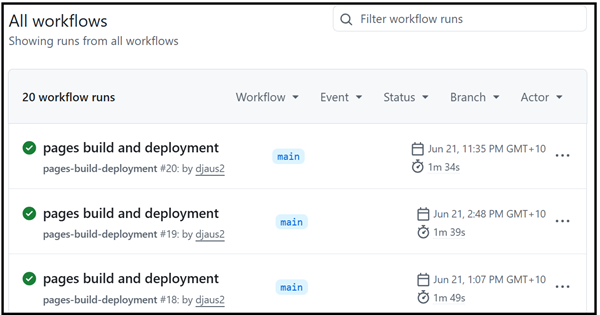
The built site as per GitHub Actions
PlugIns
As previous, the plugin for GitHub-Pages was added to the Gemfile in the root of the repository,:
gem 'github-pages', group: :jekyll_plugins
There was also a suggestion that some of the plugins might not work with GitHub Pages. Two were actually not used in the site, so they were removed from the _config.yml file.
Jekyll Mermaid Plugin
The third plugin is the Jekyll Mermaid plugin. This plugin allows you to create diagrams and flowcharts using Mermaid syntax in your Jekyll site. You can find more information about Mermaid and how to use it at https://www.mermaidchart.com/
The Gemfile entry is:
gem 'jekyll-mermaid'
For examople: Photo_Finish-Components_Diagram
Nb: I got this message:
The Mermaid plugin is not supported by GitHub Pages, so it will not work when the site is built on GitHub Pages. It will only work when the site is built locally using Jekyll.
I found it does work when deployed to GitHub Pages. The code for a diagram on a page initailly shows but after a short while, the diagram does show. The thought is that this is because the Mermaid script is loaded after the page is loaded. So it takes a short while for the diagram to be rendered.
| Topic | Subtopic | |
| Next: > | Creating this site again | GitHub Pages --- Custom Domain |
| < Prev: | Creating this site again | GitHub Pages --- Preliminary |
| This Category Links | ||
| Category: | Web Sites Index: | Web Sites |


