

Creating this site again: Larger files ... Releases
web releases github github-pages
As per a previous pst in this series, the site was built using Jekyll and deployed to GitHub Pages. However, there were some large files in the repository that exceeded GitHub’s 100 MB file size limit. This post discusses how to handle larger files and use GitHub Releases to make them available.
Basic
The simplest way is to just exclude the large files using .gitignore where you make entries for files etc to not be reposited. However, this means that the files will not be available in the repository, and links to them will be broken.
Releases
A better way is to use GitHub Releases. You can build a release for the file in its own repository and link to that from the blog post . This way, the files are still available for download, but they are not part of the main repository and do not count against the size limit. Release can be built automatically using GitHub Actions, or manually through the GitHub web interface. The release can be linked to from the blog post, and users can download the files directly via the release page.
Other options
You might also create a Nuget package. This way, users can install the package using their package manager, and the files will be available for use in their projects. However, this approach may not be suitable for all types of files, and may require additional setup and configuration.
You could also setup a GitHub Codespaces for the repository, which would allow users to access the files in a virtual environment. However, this approach may not be suitable for all users, and may require additional setup and configuration.
GitHub Releases
Whilst y9ou can manually create a release, it is possible to automate the process using GitHub Actions. This allows you to automatically build and publish releases whenever changes are made to the repository. You can configure the workflow to include the large files in the release, and users can download them directly from the release page.
There is a simple worked Hello World WPF example at djaus2/HelloWo4rldWPFApp on GitHub with the releaes at /releases. Lets unpick that a bit. The repository contains a simple WPF application that displays “Hello World” in a window. The application is built using .NET and can be run on Windows machines. The release contains the compiled application, which can be downloaded and run without needing to build the source code.
A Powershell script has been created to action the release. iT IS THE ROOT OF THE repository as release.ps1. With its first run:
HelloWo4rldWPFApp> .\release.ps1
Last version found: v1.0.8
Auto-incremented version: v1.0.9
Creating tag v1.0.9...
Pushing tag to origin...
Total 0 (delta 0), reused 0 (delta 0), pack-reused 0 (from 0)
To https://github.com/djaus2/HelloWo4rldWPFApp.git
 * [new tag]         v1.0.9 -> v1.0.9
✅ Release triggered for v1.0.9
This generated version V1.0.9, Subsequent runs will increment the last digit, eg:
✅ Release triggered for v1.0.10
View release.ps1 script here
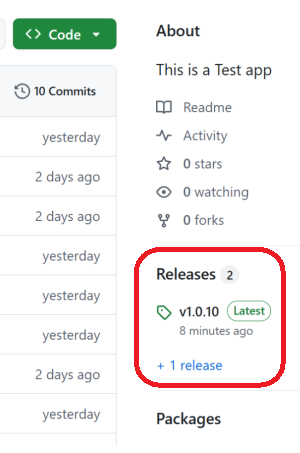
Tap and rotate phone to enlarge.
Click on Releases on the right of the repository main page
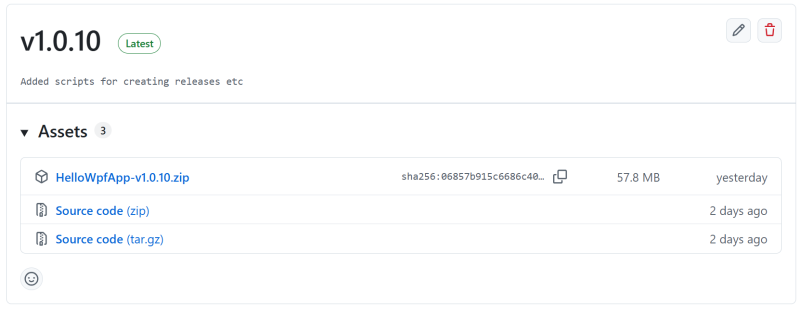
Tap and rotate phone to enlarge.
One Release showing 3 files, the zipped up app and components as well as the source as two compressed files.
| Topic | Subtopic | |
| Next: > | Jekyll | Simplify posting images to a post |
| < Prev: | Creating this site again | Limitations of GitHub Pages |
| This Category Links | ||
| Category: | Web Sites Index: | Web Sites |


