

Swiss Timing WPF App: Transmission Protocols
The transmission protocols for the Swiss Timing devices are mesages as simple ASCII strings including control characters.
Links
The GitHub repository for the app is here: SwissTimingGemini7SegDisplay
A current configuration for an athletics track using this app is displayed here MVAC Layout
The Transmission Protocols
As pre the previous post, the transmissions are serial ASCII including control characters over RS424/485. The display is essentaially a data sync with some commands able to be received. Th Siricco wind gauge is total a dat asource source. The Mistral wind gauge is an “intelligent” data source able to be configured.
1. Gemini 6 Digit 7 Segment Display
Tap and rotate phone to enlarge.
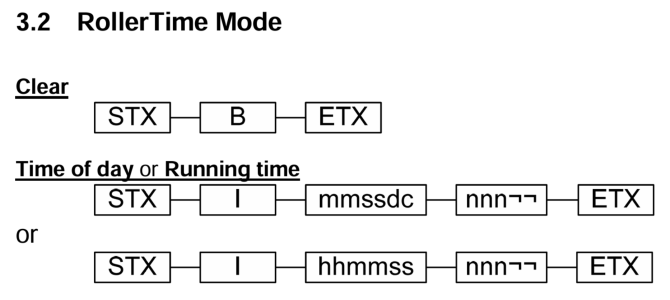
- The first 3 character command clears the display.
- The second 15 character command displays the event running time:
- Min Min : Sec Sec . Hundth Hundth
- The third 15 character command displays the wallclock time.
- nnn is 3 characters for event number or placing but is ignored by 6 digit display.
- The other 3 characters are spaces.
2. Sirrico Wind Gauge
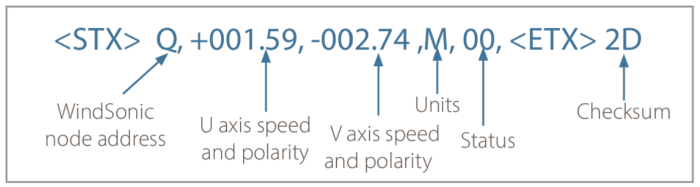
Have implemented Gill WinSonic protocol for Siricco with simulator.
6.2. Gill format – UV <– Sirrico Uses this mode In this mode, the output is given as signed (i.e., positive, or negative) speeds along the ‘U’ (= South – North) axis and the ‘V’ (= East – West) axis.
Tap and rotate phone to enlarge.
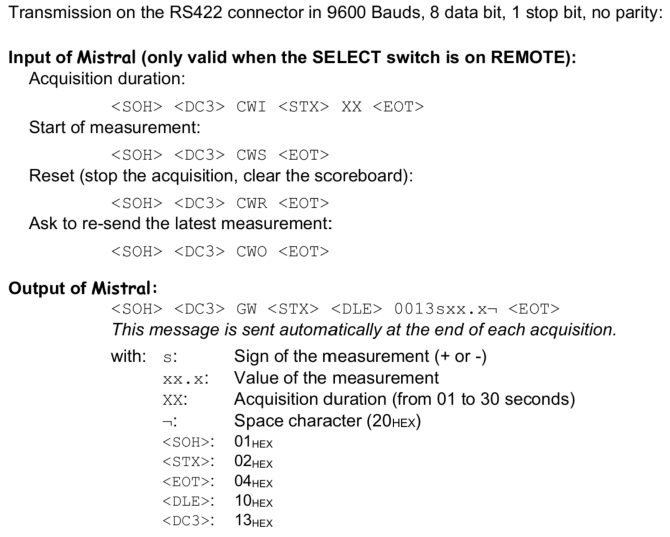
3. Mistral Wind Gauge
Tap and rotate phone to enlarge.
Some sample messages
1. Gemini Display (6 Digit)
- Send Clear command:
<STX>B<ETX> - Received data after a period:
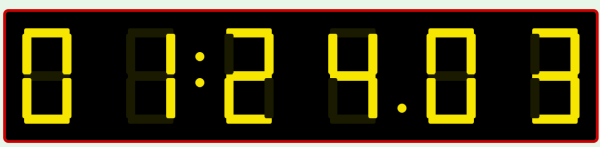
<STX>0112456000<SPC><SPC><ETX>
Elapsed Time:01:24.03
Tap and rotate phone to enlarge.
2. Siricco Wind Gauge
Received:
Wind Gauge Sent: <STX>Q,-3.6,-3.6,M,00,<ETX>30<CR><LF>
Log:
Q,-3.6,-3.6,M,00,30
Valid Siricco data:
Value1=-3.6, Value2=-3.6, Value3=0, Value4=,
SpeedUnit=MetresPerSecond
Added to tally: -3.6, Current tally: 30.20000000000001, Count: 35 Mode:Gill_UVContinuous
Finally:
Speed=-5.6 (Rounded) -5.610 (Actual) (final,Total: 224.10000000000001 over 40 measurements averaged over 10 sec )
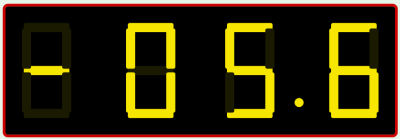
Tap and rotate phone to enlarge.
3. Mistral Wind Gauge
- Send Set 10s capture period:
<SOH><DC3>CWI<STX>10<EOT> - Send
Start Capturecommand:
<SOH><DC3>CWS<EOT> - Result received:
<SOH><DC3>GW<STX><DLE>0013+00.9<SPC><EOT>
Wind Speed:0.9 - Clear Mistral Display
<SOH><DC3>CWR<EOT>
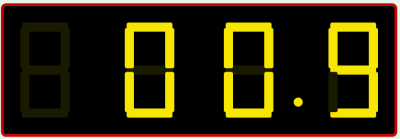
Tap and rotate phone to enlarge.
More pages to follow
| Topic | Subtopic | |
| Next: > | GitHub | Releases __ Listing number of downloads |
| < Prev: | Swiss Timing WPF App | For Athletics -- Intro |
| This Category Links | ||
| Category: | Application Dev Index: | Application Dev |


